After upgrading to the iPhone 4 last year, I had the option of trading my old iPhone 3G for cash. Instead, I decided to keep it so I could jailbreak it and unlock it from Softbank for use abroad. Unlocking the phone means that I can pick up a local SIM card, put it in the phone, and avoid roaming charges that would be incurred if I used my Japanese SIM abroad.
Of course, I would like to take my iPhone 4 abroad but I didn't feel that the upsides of the latest model were worth the risks. If it were possible to unlock my phone without jailbreaking, as it is in several countries, I would have done this. Unfortunately, Softbank does not allow this in Japan...
My family came to visit a few weeks ago and I decided to lend them my old iPhone 3G for their stay. After unlocking it, all I needed to do was find a SIM card for their short stay.
No easy task. I don't think there are any pay-as-you-go SIM cards available for purchase in Japan, especially not with data included. With the help of some friends, I did find a SIM card available for a 1 month contract at b-mobile.
b-mobile use NTT Docomo's network, which has the best coverage of any carrier in Japan. They have lots of different SIM cards available for various time periods and with various levels of service.
I chose this SIM card, which costs JPY 2,980 for 30 days use of data only. No voice or SMS.
Ordering the SIM card was quite easy - I just applied online and put in my credit card details. No English support that I could find but not too hard if you know a bit of Japanese.
The SIM card arrived at my house a few days later. Activating can be tricky though. They give you a number to call which directs you to an automatic touch dial response system with both English and Japanese support. You then have to enter a code found in the package the SIM card came in.
This is all fine but you have to call from the phone that you wish to use with the SIM card you ordered. My iPhone 3G had no SIM card and the SIM card I purchased was data only. How was I going to make a call? I called the help desk (with a different phone) who told me that they would send me an application form IN THE POST! that I would have to fill out and send back to them. I didn't have that kind of time so I told them how inconvenient that was and then hung up.
Instead, I took the SIM card from my wife's iPhone 3GS and put it in my iPhone 3G to call the activation number. I would have used my iPhone 4's SIM card but the iPhone 4 has a micro-sim which doesn't fit in the iPhone 3G.
Everything worked very well after that. In general use, I found that it took a long time to determine your location using GPS. Having GPS and google maps in your pocket is very handy in Tokyo where there are no street names and this was one reason I wanted to sort this out for my family. I suspect the delay is due to the SIM card being data only, meaning that you don't get assisted GPS, which uses nearby mobile phone towers to accelerate the process. Data speeds seemed pretty good - I guess I should have done a speed test, but it didn't cross my mind at the time.
3000 yen for unlimited 3G data use for a month is pretty good in my opinion. Recommended.
Tuesday, March 8, 2011

Thursday, August 26, 2010
A Modification of Rikaichan
How I use Anki
After my brief post on flashcards, I wanted to write about how I use Anki and a new tool that I've created to quickly grab vocab that I read on the web.
First, I'll take an example. I was reading this blogpost.
Let's take this sentence:
でも良い作品だとおもう。
and suppose that I don't know the word 作品. This is the information I want:
Word: 作品
Pronunciation: さくひん
Meaning: 製作したもの。
Sentence: でも良い___だと思う。
Gap: 作品
Source: URL to blog post
One of the best features of Anki is that it can take information like this and generate multiple cards. These are the cards that I have set up:

(click to see a larger version)
For the meaning, I tend to use a Japanese definition from an online dictionary because it captures the meaning well and is convenient. An English translation or a picture could also be used.
The source doesn't appear in the flashcards but I store it so I can go and see the context again if I need to.
The most important piece of information is the sentence. When I read it, I'm reminded of why it came up in the original material and it gives the vocab context. I know that I can use the vocab in this situation and the meaning of the word is clear in this context. If I encounter the word in a completely different context where it has a different meaning, I can add flashcards for this too.
You can add a model like this by going to Settings → Deck Properties and either edit one of the existing models or add a new one. You can then add fields for the word, the pronunciation etc. Click on the card templates tab to add the three cards I have. I suggest you look at existing models to get some ideas on how to format your cards. If there's demand, I can make a sample deck available so you can check out the model. [see update]
One big problem with flashcards is the time taken to create them. Am I wasting time creating flashcards, when I could be spending that time doing something else?
In order to solve this problem, I modified the popular extension called Rikaichan so that I could quickly pick up vocab that I read on the web.
Rikaichan
Rikaichan is an extension for the Firefox web browser. When you switch it on and hover your mouse cursor over a word, the pronunciation and meaning of the word will appear.

I have modified the extension such that when you have a word highlighted, you can press 's' to save customizable information to a text file. The information you can save is:
The highlighted word
The pronunciation of the word in hiragana
The dictionary lookup of that word (e.g. if the highlighted word is 行きます, this would be 行く)
The sentence the word appears in
The sentence the word appears in with a gap where the word is
English translation of the word from edict
The URL of the web page
A blank space
When you install rikaichan, a small smiley face will appear in the bottom right. You turn it on by clicking on this face. Move your cursor over words on the web page to see the popup.
By right clicking on the face, you can select options. You can choose which information you want to save by choosing the last tab in the options window. You can also choose where to save the text file.

Every time you press 's', your specified pieces of information will be saved to a new line in the text file. The different parts will be separated by tabs by default. You can also copy the data to the clipboard by pressing 'c'.
As you can see from the Anki model I described above, all of the information I need can be automatically saved, apart from the 'Meaning' part. For this part, I use a blank space, and I fill it in later if I need it. Surprisingly, the sentence by itself is often enough for me to remember the word.
At the end of every day at work, I save the text file and then import it into Anki by clicking File → Import...
This allows me to keep a steady stream of new vocab coming into my deck with a minimum of effort.
You can download the modified extension here.
To install, click the link and click 'Allow' when prompted. Alternatively, right click, save target as, then click File -> Open File and select the rikaichan-mod0_50.xpi file you downloaded. After that, you'll need to download the dictionaries here.
If you're using rikaichan already, delete the extension by clicking on Tools -> Add-ons then delete. No need to delete the dictionaries though.
This is a first release so there may be problems. I seriously doubt anything major will happen but I make no guarantees. Download at your own risk and all that.
The method used to fetch the sentence is very basic and I hope to improve it in the future. I've been using it for several weeks now. I use it a lot with Twitter. I chat with a lot of Japanese people and when they say words I don't understand, I click on the link to the tweet, turn on rikaichan, highlight the word and press 's'.
UPDATE: Due to demand in the comments, find a sample Anki deck here. This contains 9 cards for three words I picked up from reading the final blog post of Satoshi Kon.
UPDATE 21 April 2011: Firefox 4 broke the old add-on. Using the update to the original extension, I updated this one too. Here it is. If you have any problems, please leave a comment.
UPDATE 21 June 2011: Update to work with Firefox 5. No changes at all and haven't done much testing. Let me know if there are any problems.
After my brief post on flashcards, I wanted to write about how I use Anki and a new tool that I've created to quickly grab vocab that I read on the web.
First, I'll take an example. I was reading this blogpost.
Let's take this sentence:
でも良い作品だとおもう。
and suppose that I don't know the word 作品. This is the information I want:
Word: 作品
Pronunciation: さくひん
Meaning: 製作したもの。
Sentence: でも良い___だと思う。
Gap: 作品
Source: URL to blog post
One of the best features of Anki is that it can take information like this and generate multiple cards. These are the cards that I have set up:
(click to see a larger version)
For the meaning, I tend to use a Japanese definition from an online dictionary because it captures the meaning well and is convenient. An English translation or a picture could also be used.
The source doesn't appear in the flashcards but I store it so I can go and see the context again if I need to.
The most important piece of information is the sentence. When I read it, I'm reminded of why it came up in the original material and it gives the vocab context. I know that I can use the vocab in this situation and the meaning of the word is clear in this context. If I encounter the word in a completely different context where it has a different meaning, I can add flashcards for this too.
You can add a model like this by going to Settings → Deck Properties and either edit one of the existing models or add a new one. You can then add fields for the word, the pronunciation etc. Click on the card templates tab to add the three cards I have. I suggest you look at existing models to get some ideas on how to format your cards. If there's demand, I can make a sample deck available so you can check out the model. [see update]
One big problem with flashcards is the time taken to create them. Am I wasting time creating flashcards, when I could be spending that time doing something else?
In order to solve this problem, I modified the popular extension called Rikaichan so that I could quickly pick up vocab that I read on the web.
Rikaichan
Rikaichan is an extension for the Firefox web browser. When you switch it on and hover your mouse cursor over a word, the pronunciation and meaning of the word will appear.
I have modified the extension such that when you have a word highlighted, you can press 's' to save customizable information to a text file. The information you can save is:
The highlighted word
The pronunciation of the word in hiragana
The dictionary lookup of that word (e.g. if the highlighted word is 行きます, this would be 行く)
The sentence the word appears in
The sentence the word appears in with a gap where the word is
English translation of the word from edict
The URL of the web page
A blank space
When you install rikaichan, a small smiley face will appear in the bottom right. You turn it on by clicking on this face. Move your cursor over words on the web page to see the popup.
By right clicking on the face, you can select options. You can choose which information you want to save by choosing the last tab in the options window. You can also choose where to save the text file.
Every time you press 's', your specified pieces of information will be saved to a new line in the text file. The different parts will be separated by tabs by default. You can also copy the data to the clipboard by pressing 'c'.
As you can see from the Anki model I described above, all of the information I need can be automatically saved, apart from the 'Meaning' part. For this part, I use a blank space, and I fill it in later if I need it. Surprisingly, the sentence by itself is often enough for me to remember the word.
At the end of every day at work, I save the text file and then import it into Anki by clicking File → Import...
This allows me to keep a steady stream of new vocab coming into my deck with a minimum of effort.
You can download the modified extension here.
To install, click the link and click 'Allow' when prompted. Alternatively, right click, save target as, then click File -> Open File and select the rikaichan-mod0_50.xpi file you downloaded. After that, you'll need to download the dictionaries here.
If you're using rikaichan already, delete the extension by clicking on Tools -> Add-ons then delete. No need to delete the dictionaries though.
This is a first release so there may be problems. I seriously doubt anything major will happen but I make no guarantees. Download at your own risk and all that.
The method used to fetch the sentence is very basic and I hope to improve it in the future. I've been using it for several weeks now. I use it a lot with Twitter. I chat with a lot of Japanese people and when they say words I don't understand, I click on the link to the tweet, turn on rikaichan, highlight the word and press 's'.
UPDATE: Due to demand in the comments, find a sample Anki deck here. This contains 9 cards for three words I picked up from reading the final blog post of Satoshi Kon.
UPDATE 21 April 2011: Firefox 4 broke the old add-on. Using the update to the original extension, I updated this one too. Here it is. If you have any problems, please leave a comment.
UPDATE 21 June 2011: Update to work with Firefox 5. No changes at all and haven't done much testing. Let me know if there are any problems.
Wednesday, August 25, 2010
Flashcards for learning languages
I've been meaning to write a post about some of the strategies I use to learn Japanese. In my next post I'm going to write about some work I've been doing recently but I thought it would be best to start at the beginning. The below may be old news to some...
I have used flashcards a lot as both an English teacher (several years ago) and as a learner of Japanese. Here's an example of a flashcard:

I found this one here. It looks like it's a flashcard being used by a learner of English from India. The learner looks at one side of the card, sees the image, tries to remember the English word for it, and then checks the answer on the reverse of the card.
If you make many flashcards, you might have something like this:
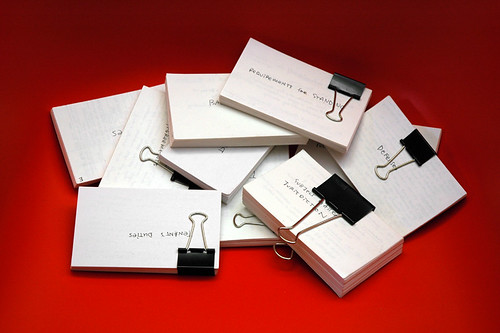
Now, here's the problem: You can practice these flashcards whenever you want, but when should you do this? How often? Which cards?
One attempt at answering these questions was given by Sebastian Leitner in 1970. He proposed a system where you get a number of boxes and line them up. You put all the cards in box 1. Cards in box 1 are reviewed often, maybe every day. Cards in box 2 are reviewed less often, maybe every 3 days. Cards in box 3 even less - maybe every 10 days. etc.
If you answer a card correctly, it moves to the second box. If you answer the card correctly again, it moves to the third box etc. If you get any card wrong, it goes back to the first box.
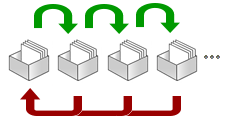
The general principle is that you spend less time looking at cards you know well and more time looking at cards you find difficult. In this way, you maximize the amount that you remember, and minimize the amount of work you need to do. This general technique is called Spaced Repetition.
Leitner's system is a simple example of Spaced Repetition. More sophisticated techniques ask how easy it was to recall the answer. Was it hard, normal or easy? If it was easy, the card gets scheduled for review very far into the future. Difficult cards are scheduled sooner.

Of course, computer software is very good at organising this for you. There are many flashcard programs out there and many of them use Spaced Repitition. I've used quite a few of them but 3 years ago I started using Anki, and I'm still using it today.
If you want to find out about Anki, I recommend watching the introductory videos on the website.
I have used flashcards a lot as both an English teacher (several years ago) and as a learner of Japanese. Here's an example of a flashcard:
I found this one here. It looks like it's a flashcard being used by a learner of English from India. The learner looks at one side of the card, sees the image, tries to remember the English word for it, and then checks the answer on the reverse of the card.
If you make many flashcards, you might have something like this:
Now, here's the problem: You can practice these flashcards whenever you want, but when should you do this? How often? Which cards?
One attempt at answering these questions was given by Sebastian Leitner in 1970. He proposed a system where you get a number of boxes and line them up. You put all the cards in box 1. Cards in box 1 are reviewed often, maybe every day. Cards in box 2 are reviewed less often, maybe every 3 days. Cards in box 3 even less - maybe every 10 days. etc.
If you answer a card correctly, it moves to the second box. If you answer the card correctly again, it moves to the third box etc. If you get any card wrong, it goes back to the first box.
The general principle is that you spend less time looking at cards you know well and more time looking at cards you find difficult. In this way, you maximize the amount that you remember, and minimize the amount of work you need to do. This general technique is called Spaced Repetition.
Leitner's system is a simple example of Spaced Repetition. More sophisticated techniques ask how easy it was to recall the answer. Was it hard, normal or easy? If it was easy, the card gets scheduled for review very far into the future. Difficult cards are scheduled sooner.
Of course, computer software is very good at organising this for you. There are many flashcard programs out there and many of them use Spaced Repitition. I've used quite a few of them but 3
If you want to find out about Anki, I recommend watching the introductory videos on the website.
Wednesday, August 11, 2010
Mr. and Mrs. Wright Search for the Right Baby Name
My wife and I are struggling to find a name for our baby, due in January. Boys names are particularly difficult if you're looking for a name that works in both Japanese and English. We don't know the sex of our baby yet but if it's a boy, we may struggle.
My wife really liked the name "Sky" because it sounds nice in Japanese - スカイ - and you can choose some beautiful kanji for it:
澄 meaning "clear" or "translucent" and
海 meaning "the sea"
So 澄海 could be a way to write the name Sky, meaning a clear sea, which is a lovely image for the sky.
Very poetic. However, I've never heard of the name in English and I'd rather not imitate the Hollywood couples that give their kids very strange names.
But then I remembered the Isle of Skye, a beautiful island off the coast of Scotland. I thought that if we spelled the name "Skye", then I might be willing to concede the weirdness point in order to insert some Scottish influence. Ridiculous, I know.
But then it dawned on me. For the Japanese, the L sound and the R sound are indistinguishable. A "light" is pronounced in exactly the same way as my surname, "Wright". Indeed, lights are often called ライト (raito) and this is exactly the same as my surname. A source of much amusement for our friends and the butt of many a joke at our wedding.
If we named our child Sky Wright, it would inevitably be pronounced Sky Light in Japanese.
Back to drawing board.
My wife really liked the name "Sky" because it sounds nice in Japanese - スカイ - and you can choose some beautiful kanji for it:
澄 meaning "clear" or "translucent" and
海 meaning "the sea"
So 澄海 could be a way to write the name Sky, meaning a clear sea, which is a lovely image for the sky.
Very poetic. However, I've never heard of the name in English and I'd rather not imitate the Hollywood couples that give their kids very strange names.
But then I remembered the Isle of Skye, a beautiful island off the coast of Scotland. I thought that if we spelled the name "Skye", then I might be willing to concede the weirdness point in order to insert some Scottish influence. Ridiculous, I know.
But then it dawned on me. For the Japanese, the L sound and the R sound are indistinguishable. A "light" is pronounced in exactly the same way as my surname, "Wright". Indeed, lights are often called ライト (raito) and this is exactly the same as my surname. A source of much amusement for our friends and the butt of many a joke at our wedding.
If we named our child Sky Wright, it would inevitably be pronounced Sky Light in Japanese.
Back to drawing board.
Friday, April 23, 2010
Chocolate Sparkling
In my continuing quest to try all of the strange and wonderful drinks that come out here in Japan, this morning I spotted a new one in a vending machine on the street.

Chocolate Sparkling. Imagine putting some poor quality chocolate in your mouth and then taking a swig of soda water. That's exactly how it tastes.
Verdict: horrible.
Chocolate Sparkling. Imagine putting some poor quality chocolate in your mouth and then taking a swig of soda water. That's exactly how it tastes.
Verdict: horrible.
Thursday, April 15, 2010
Organising Office Parties
I've written about using name seals (inkan) in Japan before. Their main use is for stamping documents saying that you've read the contents and approve. They're also used in other non-official circumstances like this one:

You print out a schedule or calendar and get everyone to stamp the days that they're unavailable. The person in charge of organising the event or party uses this to work out a suitable date. In this case, the party is being held to welcome me into the department I've been newly assigned to. Whenever someone enters the company or moves to a new department, this always happens.
All of the official documents come round on clipboards just like this one. In those cases, the contents are obviously a lot more serious and formal. Once everyone has read it and approved, it usually goes up to the CEO and when he stamps it, it comes back down to us mortals and we file it away.
You print out a schedule or calendar and get everyone to stamp the days that they're unavailable. The person in charge of organising the event or party uses this to work out a suitable date. In this case, the party is being held to welcome me into the department I've been newly assigned to. Whenever someone enters the company or moves to a new department, this always happens.
All of the official documents come round on clipboards just like this one. In those cases, the contents are obviously a lot more serious and formal. Once everyone has read it and approved, it usually goes up to the CEO and when he stamps it, it comes back down to us mortals and we file it away.
Wednesday, April 14, 2010
Salt & Lime for Breakfast
Kirin have brought out a drink that I haven't seen before. Picked it up from the conbini on the way to work. Salty Lime in Japanese, Salt and Lime in English. It tastes exactly like it sounds. I like it.

Subscribe to:
Posts (Atom)